Mesh WiFi vs. Wired Access Points: What We Install in Atlanta Homes
"When a mesh kit is good enough, when ceiling access points like UniFi are worth the cable, and what moves the cost in typical Atlanta two-story and basement homes."
You have a dead zone. Maybe it's the bonus room over the garage, the basement theater, or the back patio. You're choosing between mesh WiFi vs wired access points: buy a kit and plug it in, or pay someone to run cable to the ceiling. Both can work. The right one depends on your house more than on any brand.
The short answer
Mesh is good enough when your home is mostly on one or two floors, the rooms are fairly open, and each mesh unit can sit where it still has a strong signal back to the main one. Wired access points are worth it in large two-story homes, homes with finished basements, brick or block walls, or anywhere the WiFi has to hold up for work calls, streaming and cameras at the same time.
The middle option is mesh with Ethernet backhaul: mesh units connected by cable instead of by radio. That gets most of the benefit of wired access points.
On cost: a mesh kit is something you can buy and set up yourself. A wired access point needs one Ethernet drop, which runs about $450 each, depending on the house. Our network installs start from $1,500.
How each one works
Mesh with wireless backhaul
A mesh kit is a main unit at your modem plus one or more satellites around the house. The satellites talk to each other over WiFi. That link is the backhaul.
The catch is that the backhaul shares radio airtime with your devices. Every hop away from the main unit costs speed, and every floor, brick wall or duct between units weakens the link. Tri-band kits dedicate one radio to the backhaul, which helps, but it can't fix distance or a concrete basement ceiling.
Mesh WiFi vs Ethernet backhaul
Many mesh systems let you plug each satellite into an Ethernet jack. Now the units talk over cable, and all of the radio goes to your devices. If your house already has Ethernet in the right rooms, this is often the cheapest big upgrade you can make.
The limit: mesh units usually sit on a shelf or desk, wherever there's a jack and an outlet. That's rarely the best spot for coverage.
Wired ceiling access points
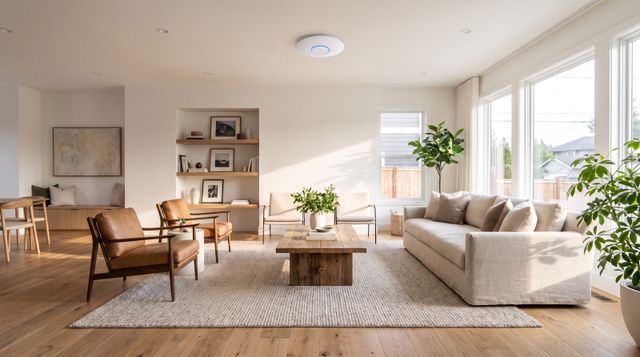
An access point (AP) is a dedicated WiFi radio, usually mounted flat on the ceiling, with one cable home-run back to a network rack or closet. That one cable carries data and power (PoE, Power over Ethernet), so the AP needs no outlet.
Ceiling mounting matters. A ceiling AP sits above furniture, bodies and TVs, and spreads signal down and out across the room. Two or three well-placed APs beat any single router, and they beat most wireless mesh setups in a large house, because there is no wireless hop to lose speed on.
Where UniFi fits
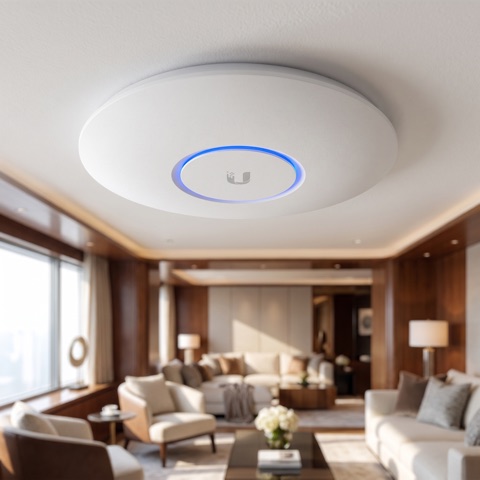
Ubiquiti's UniFi line is what most people find when they search for Ubiquiti access points for home use. A UniFi AP is a flat white disc about the size of a smoke detector, powered over the same cable that carries its data, and every AP on the network is managed from one app. It's a good picture of what a wired ceiling AP looks like and how it behaves.
The brand matters less than the cable and the placement. A UniFi AP sitting on a shelf at the end of a wireless hop would have the same problems as a mesh satellite.
Typical Atlanta layouts and what fits
Two-story with a finished basement
This is the common layout in Suwanee, Johns Creek, Alpharetta and Milton, and it's where wireless mesh struggles most. The modem is often in a basement corner or a first-floor office. A satellite upstairs has to reach through a floor and a framed ceiling. A satellite in the basement has to reach through the subfloor and sometimes a concrete wall.
What usually works: one AP per floor, placed near the center, with a fourth for a large basement or a back patio. This is the house where wired access points pay off, and the best WiFi for a large house in this layout is almost always wired.
Ranch or single-story
If the rooms open into each other, a good mesh kit with two or three units is often fine. Spread-out ranches with a far wing or a detached garage can still need a wired AP at the far end.
Three-story townhome
Common in Sandy Springs and Buckhead. Floors stack tightly, so mesh can work if each unit sits near the stairwell. If the garage level has the modem and you work on the top floor, a wired AP up there fixes it.
New construction
If the walls are still open, run cable now. Pulling Cat6 to ceiling AP locations before drywall is the easiest it will ever be. Our list of smart home upgrades for new construction covers what else to wire while you can.
How to tell if mesh is good enough
You don't have to guess. Most phones and network apps can show signal strength in dBm.
- −30 to −67 dBm is great. If your problem rooms read in this range, your issue is probably the internet plan or the router, not coverage.
- Below −70 dBm, that zone needs attention. If a mesh satellite placed between the main unit and that room can't bring it into range, the wireless backhaul is the bottleneck.
Also check speed at the satellite itself, not just signal. A strong signal to a satellite with a weak link back to the main unit still feels slow. Bandwidth is how wide the pipe is; speed is how fast your device actually drinks. A gig plan through one weak link still sips.
What moves the price
Mesh kit prices depend on the brand and model you pick, so we don't quote them. For wired access points, these move the number:
- Number of APs. Each one needs its own drop, about $450 each, depending on the house.
- How hard the cable runs are. Open basement ceilings and attic access make runs easier. Finished basements, two-story walls with no chase, and brick exteriors take more time.
- Where the network gear lives. A closet near the center of the house means shorter runs than a modem in the far corner of the basement.
- What else rides on the network. Wired cameras, a theater, or wired TVs and desks add drops but share the same rack and switch.
Our home network installation cost guide breaks down the rest of the scope.
Mistakes to avoid
- Adding more mesh units to fix a weak backhaul. Each extra wireless hop can make the far end slower, not faster.
- Putting the main unit in a cabinet or basement corner. Wherever the signal starts limits everything downstream.
- Using WiFi for things that don't move. TVs, desktops, game consoles and cameras are better on cable. Every device you move off WiFi frees airtime for phones and laptops. We explain the camera side in wired vs. wireless security cameras.
- Mounting APs high on a wall near a corner. Coverage follows placement. The center of the ceiling on each floor almost always does better.
- Running a mesh kit and a separate router's WiFi at the same time. Two systems broadcasting fight each other. Pick one to run the WiFi.
What we install
In most Metro Atlanta homes we're called to, the house is two stories or more, has a basement or bonus room, and already has a mesh kit that didn't fix the problem. For those homes we install wired ceiling access points: one cable per AP, home-run to a rack, powered over PoE, placed by floor plan instead of by where the outlets are.
If you already have Ethernet in the right rooms and a mesh system that supports wired backhaul, we'll tell you to try that first. It's sometimes all you need.
A solid network also carries everything else in the house: cameras, home automation, streaming and work calls. That's why we treat it as the foundation, not an add-on.
Price your network
Your floor plan, wall materials and where the modem lands matter more than any brand. Our online planner lets you price access points and Ethernet drops for your home in a couple of minutes. StarlightATL offers free consultations across Metro Atlanta, including Suwanee, Johns Creek, Alpharetta, Duluth, Roswell and Sandy Springs. You can book a consultation or learn more about our home network and Ethernet installation.
Ready to Transform Your Space?
StarlightATL offers free consultations for Metro Atlanta homeowners. Let's talk about your vision.
Related Services
See how StarlightATL brings this to life in Metro Atlanta homes.